
How to Change Your Name in K Electric Bill 2026
If you’ve recently purchased a new property or the electricity connection is still registered under someone else’s name, updating the name on your K-Electric (KE) bill is essential.
This guide explains the complete process of changing the name on your KE bill, both online and offline, in a simple and practical way.
Why It’s Important to Update Your Name on KE Bill
Changing the name is not just a formality, it protects you legally and avoids future complications.
1. Proof of Ownership
Your electricity bill acts as supporting proof of residence and ownership in many situations.
2. Avoid Legal Issues
If the bill is in someone else’s name, it can create problems in property disputes or verification processes.
3. Smooth Utility Management
Having your name on the bill ensures you can easily manage load changes, complaints, or billing issues.
Requirements for Name Change
Before applying, make sure you have the following documents ready:
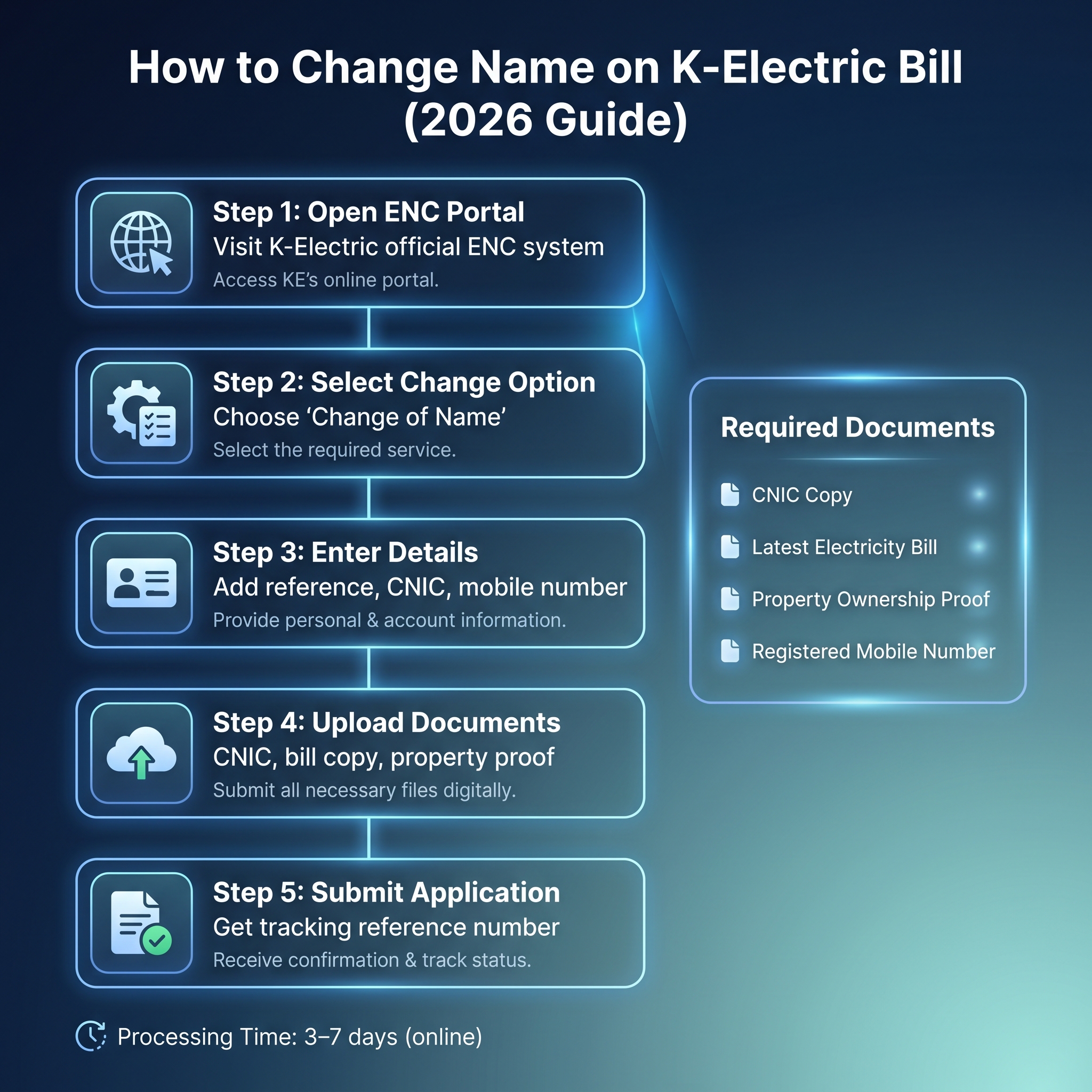
- Copy of CNIC (Computerized National Identity Card)
- Latest K-Electric Bill copy
- Proof of property ownership (Sale deed / registry / allotment letter)
- Mobile number (registered on your CNIC)
How to Change Name on KE Bill Online (ENC System)
K-Electric provides an online system called ENC (Electricity New Connection portal), where you can request changes without visiting an office.
Step-by-Step Process:
- Visit the official ENC portal
- Click on the “Change” option
- Select “Change of Name”
- Enter your:
- Reference Number
- CNIC Number
- Mobile Number
- Provide current account holder details
- Enter your new name and father/husband name
- Upload required documents:
- CNIC copy
- Electricity bill
- Property proof
- Accept terms and submit your application
After submission, you will receive a tracking reference.
Helpful Tip
Before applying, make sure your current bill details are correct. You can easily check your latest kesc duplicate bill online to verify all information before submitting your request.
Offline Method (Visit K-Electric Office)
If you prefer manual processing, you can visit the nearest KE Customer Service Center.
Steps:
- Visit your nearest KE office
- Request a Name Change Application Form
- Fill in all details carefully
- Attach required documents:
- CNIC copy
- Latest bill
- Property ownership proof
- Submit the form
Your request will be processed after verification.
Common Mistakes to Avoid
Many applications get delayed due to simple errors. Avoid these:
- Incorrect CNIC number
- Spelling mistakes in name
- Missing documents
- Unverified property ownership
Always double-check before submission.
How Long Does It Take?
- Online requests: Usually 3–7 working days
- Offline requests: May take 5–10 working days
Processing time can vary depending on verification.
FAQs
Q1: How can I change the name on my KE bill?
Ans: You can apply online through the ENC system or visit a KE customer service center with required documents.
Q2: Is property ownership proof necessary?
Ans: Yes, it is required to verify that you are the rightful owner or occupant.
Q3: Can I apply without visiting the office?
Ans: Yes, the online ENC portal allows you to complete the entire process digitally.
Q4: What if my application is rejected?
Ans: You can reapply after correcting errors or missing documents.
Final Words
Changing the name on your K-Electric bill is a simple but important step after buying or transferring property. By following the correct process and submitting accurate documents, you can complete the update without delays.
Make sure to double-check all details and use the online method for faster processing.


